$("선택자").val();
input요소의 value값을 가져온다.
ex) $("input").val();
$("선택자").val("값");
input요소의 value값을 넣는다.
ex) $("input").val("aaaaaa");
예제1
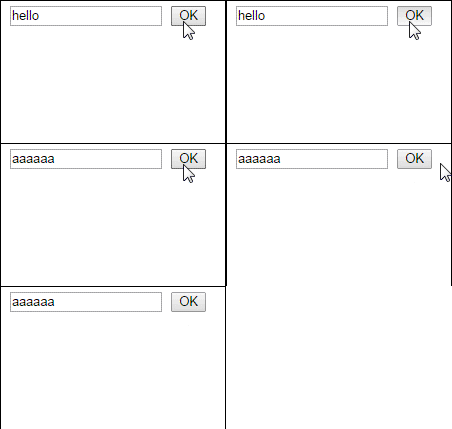
<!DOCTYPE html PUBLIC "-//W3C//DTD XHTML 1.0 Transitional//EN" "http://www.w3.org/TR/xhtml1/DTD/xhtml1-transitional.dtd">
<html xmlns="http://www.w3.org/1999/xhtml" lang="ko" xml:lang="ko">
	<head>
		<meta name="generator" content="editplus" />
		<meta name="author" content="" />
		<meta name="keywords" content="" />
		<meta name="description" content="" />
		<meta http-equiv="content-type" content="text/html;charset=utf-8" />
		<title> new document </title>
		<style type="text/css">

		</style>
		<script src="http://ajax.googleapis.com/ajax/libs/jquery/1.11.1/jquery.min.js" type="text/javascript"></script>
		<script type="text/javascript">
		//<![CDATA[
			$(document).ready(function(){
				$("button").click(function(){
					$("input").val("aaaaaa");
				});
			});
		//]]>
		</script>
	</head>
	<body>
		<input type="text" value="hello" />
		<button>OK</button>
	</body>
</html>
예제2
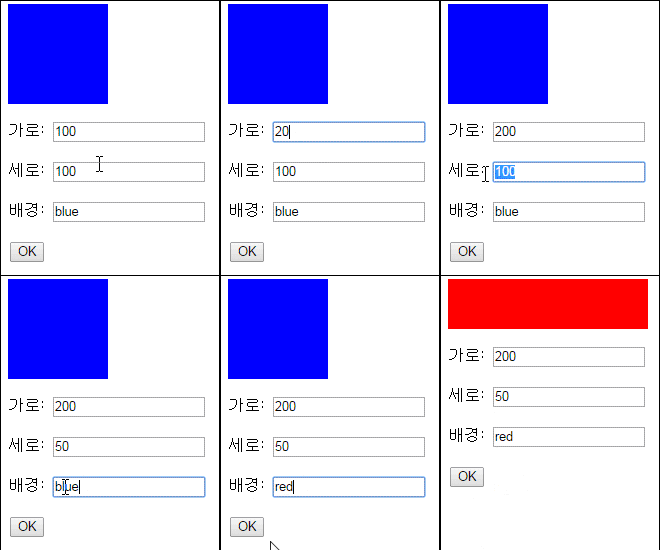
<!DOCTYPE html PUBLIC "-//W3C//DTD XHTML 1.0 Transitional//EN" "http://www.w3.org/TR/xhtml1/DTD/xhtml1-transitional.dtd">
<html xmlns="http://www.w3.org/1999/xhtml" lang="ko" xml:lang="ko">
	<head>
<meta http-equiv="content-type" content="text/html;charset=utf-8" />
		<title> new document </title>
		<style type="text/css">
			div{width:100px;height:100px;background:blue}
		</style>
		<script src="http://ajax.googleapis.com/ajax/libs/jquery/1.11.1/jquery.min.js" type="text/javascript"></script>
		<script type="text/javascript">
		//<![CDATA[
			$(document).ready(function(){
				$("button").click(function(){
					var w=$("input").eq(0).val();
					var h=$("input").eq(1).val();
					var bg=$("input").eq(2).val();
					$("div").css({width:w,height:h,background:bg});
				});
			});
		//]]>
		</script>
	</head>
	<body>
		<!-- div의 input값으로 css 변경하기 -->
		<div></div>
		<p>가로: <input type="text" value="100" /></p>
		<p>세로: <input type="text" value="100" /></p>
		<p>배경: <input type="text" value="blue" /></p>
		<button>OK</button>
	</body>
</html>
예제3

<!DOCTYPE html PUBLIC "-//W3C//DTD XHTML 1.0 Transitional//EN" "http://www.w3.org/TR/xhtml1/DTD/xhtml1-transitional.dtd">
<html xmlns="http://www.w3.org/1999/xhtml" lang="ko" xml:lang="ko">
	<head>
		<meta http-equiv="content-type" content="text/html;charset=utf-8" />
		<title> new document </title>
		<style type="text/css">
			#i1{position: absolute;left:0;top:0}
			#i2{position: absolute;left:180px;top:0}
		</style>
		<script src="http://ajax.googleapis.com/ajax/libs/jquery/1.11.1/jquery.min.js" type="text/javascript"></script>
		<script type="text/javascript">
		//<![CDATA[
			$(document).ready(function(){
				var count=0;
				var mySrc=null;
				var myId=null;
				$("img").click(function(){
					count++;
					if(count==1){
						//첫번째로 클릭
						mySrc=$(this).attr("src");
						myId=$(this).attr("id");
					}else{
						//두번째로 클릭
						var mySrc2=$(this).attr("src");//두번째 그림의 src
						$("#"+myId).attr("src",mySrc2);
						$(this).attr("src",mySrc);
						count=0;
					}
				});
			});
		//]]>
		</script>
	</head>
	<body>
		<!-- 이미지의 위치 바꾸기 -->
		<span id="i1"><img src="images/img_01.jpg" alt="" id="a" /></span><span id="i2"><img src="images/img_02.jpg" alt="" id="b" /></span>
	</body>
</html>
.css("속성")-스타일속성 값을 가져옴,.css("속성","값")-스타일속성 값을 넣는다.
.attr("속성")-속성 값을 넣는다속성 값을 가져옴,.attr("속성","값")-속성 값을 넣는다
.text()-텍스트를 모두 가져온다.,.text("str")-이전 내용을 무시하고 "str"를 넣는다.
.html()-html을 모두 가져온다.,.html("<h1></h1>")->이전 내용을 무시하고 h1요소를 넣는다.
.val()-input요소의 value값을 가져온다., .vql("vvv") - input요소의 value에 vvv를 넣는다.
댓글 0
댓글 쓰기 권한이 없습니다.
| 41 | 이클립스 jQuery 플러그인 | 2014.10.27 |
| 40 | 140813_[jquery] 이벤트 | 2014.09.23 |
| 39 | 140813_[jquery] 마우스 이벤트 | 2014.09.23 |
| 38 | 140813_[jquery] hover | 2014.09.23 |
| 37 | 140813_[jquery] mouseover | 2014.09.23 |
| 36 | 140813_[jquery] setInterval | 2014.09.23 |
| 35 | 140812_[jquery] show(slide) | 2014.09.23 |
| 34 | 140811_[jquery] animate | 2014.09.23 |
| 33 | 140811_[jquery] 왼쪽 slide menu | 2014.09.23 |
| 32 | 140808_[jquery] slideUp/slideDown | 2014.09.23 |
| 31 | 140808_[jquery] hide/show | 2014.09.23 |
| 30 | 140808_[jquery] fadeout | 2014.09.23 |
| > | 140808_[jquery] val | 2014.09.22 |
| 28 | 140807_[jquery] html | 2014.09.22 |
| 27 | 140807_[jquery] text,attr | 2014.09.22 |
| 26 | 140806_[jquery] text | 2014.09.22 |
| 25 | 140806 -[jquery] attr | 2014.09.22 |
| 24 | 140805 -[jquery] css,selector | 2014.09.18 |
| 23 | jqury 소스 링크 | 2014.08.26 |
| 22 | 140725_1 | 2014.07.25 |